When hard drives fail and blue screens abound, students with a myNotebook laptop have sought out the support services of Information Technology. But most students at the College of William and Mary have no knowledge of what goes on behind the scenes in the basement of Jones Hall.

The College’s IT department maintains the campus computer labs, phone system, myWM, Banner and the e-mail servers.

Usually students only encounter the public face of the department when two student employees at the front desk attempt to diagnose a computer’s problem and repair it on the spot.

“Some things you’re replacing right here while you wait, so we do some keyboards, CD drives, AC adapters, hard drives,” Manager of Technology Support Center Brian Persinger said.

Of all of the computers brought to IT, around 20 percent of them are repaired at the front desk, within fifteen minutes. But if the damage is more serious, the computer is checked in and brought to the back room where staff technicians dismantle the computer to replace broken parts.

“Spills are a pain,” Technology Support Engineer Danny Clouser said. “I had one yesterday where I had to replace eight or 10 parts because somebody dumped a coke on it.”

The technicians can draw from numerous drawers filled with the parts for each computer model in the
myNotebook program.

“The way it works is that [the manufacturers] give us one computer for every 100 computers sold and we take that one computer and break it down into parts,” Persinger said.

Once the broken parts are replaced in a student’s laptop, the broken pieces are sent to the manufacturer, who then restocks the parts assembly in IT’s back room. When the computer is fixed, it heads to the front desk for the student to pickup.

Computers are usually returned within a day, with three days as the maximum. If a computer has multiple parts failures, the technicians will sometimes, reluctantly, send the computer back to the manufacturer for repair or replacement of the unit.

“We always want to get the computer back in the student’s hands as quickly as possible so they can do their schoolwork,” Persinger said.

Persinger said that IT has recently changed its support policy to stop backup and data retrieval for myNotebook computers because a single hard drive would take the staff hours to backup.

“Our turn-around time was always around three days, but we wanted that to be our maximum, not our norm,” he said. “So we decided to make some changes which was getting some repairs done up front and eliminating us being responsible for helping users restore data.”

Technicians will not only repair any myNotebook computer, but also will attempt to fix any student, staff and faculty Lenovo or Dell computer that has an active hardware warranty.

Though they are not directly involved, the department also provides consulting to the Tribe Apple Center in the ID Office.

The myNotebook program, established five years ago, was designed to have a consistent hardware in the student populace.

“It would have given the professors much more flexibility to incorporate technology into their teaching because everybody had [the same computer],” Chris Ward, Director of Systems and Support said. “But that didn’t work.”

The idea never truly took off as diversity in campus computers has increased over the years.
myNotebook laptops have declined in popularity, and now constitute only 50 percent of College’s computers, down from 80 percent five years ago.

IT strongly recommends that all students back up their hard drive. Ward said that one professor had to learn that the hard way when she paid $1,000 dollars to an outside company to extract her book off a failed hard drive.

“We have a tech that always says there are two kinds of people,” Ward said. “There are those who have lost data and those who will lose data. So back-up your data.”

Internet Explorer 7 (IE7) is light years ahead of its predecessors, but by no means does that proclamation mean that the browser is perfect. You are still going to encounter issues with IE from time to time.

Here are some of the concise guides that deliver some troubleshooting steps that will clear up the majority of issues we encountered with IE7.

Issues with Internet Explorer 7.0 with solutions

Problem: Crashes or hangs

If IE crashes, the most likely problem is that there's a buggy add-on (Toolbar or Browser Helper Object). In order to verify and isolate the buggy add-on, follow these steps:

1. Start IE in No Add-ons mode, either by right-clicking the Desktop icon, or clicking START - RUN and typing: iexplore.exe -extoff

2. Determine if IE fails.

3. If not, use Tools - Manage Add-ons to disable all browser extensions and toolbars.

4. Restart IE and re-enable browser extensions one-by-one.

5. Once you've found a broken extension, contact the manufacturer and ask for an update.

(Reference: http://support.microsoft.com/?id=928426)

If IE still crashes often, even when browser add-ons are disabled:

• Please ensure that you are running the very latest version of your anti-virus, anti-malware, and/or firewall programs.

• Please ensure that the drivers for your graphics card are up to date.

• If you have Google Desktop installed, please ensure that you update to the latest version of Google Desktop.

• If you have 7-Zip or other Windows Explorer extensions installed, please ensure that you update to the latest.

Problem: Cannot connect to Internet using IE after updates installed

If you see the "Page Cannot be Displayed" error after installing Internet Explorer updates from Windows Updates, it's possible that you have a 3rd party firewall installed that is blocking access because the IE files have been updated. Please see http://support.microsoft.com/kb/942818/en-us for more information.

Problem: IE always starts in "No Add-ons" mode

The problem is that you're launching Internet Explorer using a shortcut icon that has the "-extoff" command line parameter. That parameter causes IE to start without add-ons. Thus, every time you use that shortcut icon, IE will start in No Add-ons Mode.

1. How do you normally start Internet Explorer? Right-click whatever icon you're using to start IE, choose "Properties" and remove the -extoff part of the shortcut.

2. If you click the green START button, click Run, type iexplore.exe in the RUN box, then hit the ENTER key, IE will start with Addons enabled.

Problem: IE opens small windows

IE opens new windows at the size of the last closed window. If you find that IE is opening small windows, do this:

• Close all IE windows.
• Open one new IE window.
• Adjust that window to the size you prefer. Do this by dragging the window borders. Do not use the maximize button:
• Close the IE window.
• New IE windows will open at the size you chose.

Problem: ClearType Text appears fuzzy

IE7 turns on a text-smoothing technology called "ClearType" by default. ClearType is scientifically proven to make text easier to read, particularly on LCD flat panel monitors.

If ClearType looks fuzzy on your monitor, you might want to try the ClearType tuning wizard, which can help you adjust the display of ClearType.

If you still don't like the appearance of ClearType, you can turn it off by unchecking the checkbox: Tools - Internet Options - Advanced - Multimedia - Always use ClearType for HTML.

Problem: IE Startup takes a long time (>3 seconds)

1. IE may start very slowly if you have a huge number of sites listed in your Restricted or Trusted sites zone. Some tools, like "SpyBot Search & Destroy" will place thousands of sites in these zones if you use their "immunize" feature.

2. Follow the "Crashing on startup" steps above to see if starting in No Add-ons mode starts much faster

3. If you're not using a proxy, uncheck IE's "Automatically detect settings" option on the Tools - Internet Options - Connections - LAN Settings dialog.

Problem: Slow Page rendering

1. Increase the connection limit. This tweak allows IE to make up to 16 connections per server.

2. Ensure that both "HTTP1.1" checkboxes in Tools - Internet Options - Advanced are checked.

Problem: IE7 Setup fails to install Internet Explorer

See http://support.microsoft.com/kb/917925

Problem: My address bar won't turn green?

IE7 includes a cool new feature that turns the address bar green when a secure site presents an Extended Validation certificate:

If you're having trouble with this feature, on a site you know has an EV certificate:

1. Ensure that you either have the Phishing Filter set to "Automatic" mode or Tools > Internet Options > Advanced > Security > Check for Server Certificate revocation checked.

2. If that doesn't work, install this: Windows Root Certificate Update and restart.

Problem: After installing, IE7 starts then vanishes

It's possible that one of IE's DLLs isn't installed correctly

1. Click START - RUN and type cmd
2. In the command prompt, type cd\
3. In the command prompt, type cd Program Files
4. In the command prompt, type cd Internet Explorer
5. In the command prompt, type regsvr32 IEPROXY.DLL

(Reference: http://support.microsoft.com/?id=928427)

Problem: Error message about PSAPI.DLL

If you install IE7 and the following error message begins to show:

The procedure entry point GetProcessImageFileNameW could not be located in the dynamic link library PSAPI.DLL

1. Search your hard disk for PSAPI.dll.

2. Any copies of this DLL that are found outside of the Windows or Windows\System32 folder should be renamed to PSAPI.bak.

Problem: IE always goes to http://runonce.msn.com/runonce2.aspx instead of my homepage

If IE7 always goes to the RunOnce page on startup, even after you've tried to save the first run settings, it's possible that the mechanism that IE is using to save the settings does not work for some reason.

You can prevent IE from going to the RunOnce page and cause it to go directly to your homepage by running this script.

For more info, check out this Knowledge Base article.]

Problem: IE always goes to http://www.microsoft.com/windows/downloads/ie/getitnow.mspx instead of my homepage

If Internet Explorer always goes to this page on startup, it's likely that you have an anti-spyware package (like "SpyBot") that prevented IE from correctly modifying your registry.

Try running this script. Note: you may need to disable your anti-spyware tool temporarily for the script to work.

Problem: On startup, IE always shows an error message about the AOL toolbar

If you see the following error message every time IE starts:

"Cannot find 'file:///C:/Program%20Files/AOL%20Toolbar/welcome.html'. Make sure the path or Internet address is correct."

..then you've hit a bug in the AOL Toolbar.

Try running this script. Note: you may need to disable your anti-spyware tool temporarily for the script to work.

Problem: I installed a "branded" version of IE7, but I'd prefer a "plain" copy without toolbars and customizations.

An article on this topic can be found here: How to remove branding in Internet Explorer 7.

Problem: Malware / Adware

If Internet Explorer is behaving strangely (crashing, visiting unwanted sites, etc), it's possible that there is malicious software installed on your computer.

As a first step, you should allow your antivirus software to scan and attempt to repair your computer. Additionally, you may want to try the following Microsoft tools:

• Windows Defender
• Windows Live OneCare
• Windows Live Safety Center
• Malicious Software Removal Tool

You should also ensure your computer has all the security updates available at Microsoft Update.

Problem: My searches are redirected to unrelated sites and I cannot connect to WindowsUpdate or antivirus websites

If Internet Explorer searches are redirected to unrelated sites or search engines, it's possible that your computer was infected with malware (see the previous tip). However, if your computer is not currently infected with malware, it's possible that at some time in the past, malicious software altered your computer's DNS settings. DNS works like an "internet phonebook" that maps URLs (like "windowsupdate.microsoft.com") to internet protocol addresses (like "207.46.225.221").

To determine if a malicious DNS server is configured:

- Go to Start -> Control Panel ->Network Connections.

- Right click your default connection, usually Local Area Connection or Dial-up Connection, if you are using Dial-up, and left click on Properties.

- Double-click on the Internet Protocol (TCP/IP) item

Check to see if you're set to something other than "Obtain DNS servers automatically". If so, contact your ISP to ensure that the address specified is correct, or set the "Obtain DNS servers automatically" checkbox. Then restart your computer.

Problem: After opening many tabs, Windows and IE paint abnormally.

See http://blogs.msdn.com/tonyschr/archive/2005/05/25/desktop-heap-limitations.aspx

Problem: A remote user is having networking problems with Internet Explorer. How can I collect information about his system to help me to troubleshoot?

Have the user run Netcheck and send you the log file.

Problem: Overlong headers result in HTTP/4xx or HTTP/5xx errors, particularly on devices like routers or webcams

Problems of this nature are usually caused by one of the two request headers in yellow being longer than the device expects.

GET / HTTP/1.1

Accept: image/gif, image/jpeg, image/pjpeg, application/x-ms-application, application/vnd.ms-xpsdocument, application/xaml+xml, application/x-ms-xbap, application/vnd.ms-excel, application/vnd.ms-powerpoint, application/msword, application/x-shockwave-flash, application/x-silverlight, application/x-silverlight-2-b2, */*

Accept-Language: en-us

User-Agent: Mozilla/4.0 (compatible; MSIE 8.0; Windows NT 6.0; WOW64; Trident/4.0; SLCC1; .NET CLR 2.0.50727; .NET CLR 1.1.4322; InfoPath.2; .NET CLR 3.5.30729; .NET CLR 3.0.30618; OfficeLiveConnector.1.3; OfficeLivePatch.1.3; MS-RTC LM 8)

Accept-Encoding: gzip, deflate

Connection: Keep-Alive

Host: 192.168.10.1

These headers are dynamically generated out of registry keys. They can usually be trimmed by editing the registry without any important side-effects.

To trim the list in the Accept header, click START > RUN > REGEDIT.EXE. Using RegEdit, navigate to:

HKEY_LOCAL_MACHINE\Software\Microsoft\Windows\CurrentVersion\Internet Settings\Accepted Documents

..and remove elements from the "Name/Type/Value" list to remove values that aren't strictly required. Elements in red are of lower importance than those in black:

image/gif, image/jpeg, image/pjpeg, application/x-ms-application, application/vnd.ms-xpsdocument, application/xaml+xml, application/x-ms-xbap, application/vnd.ms-excel, application/vnd.ms-powerpoint, application/msword, application/x-shockwave-flash, application/x-silverlight, application/x-silverlight-2-b2, */*

A similar problem can occur with the User-Agent header.

To trim the list in the User-Agent header, click START > RUN > REGEDIT.EXE. Using RegEdit, navigate to:

HKEY_LOCAL_MACHINE\Software\Microsoft\Windows\CurrentVersion\Internet Settings\5.0\User Agent\Post Platform

HKEY_LOCAL_MACHINE\Software\Microsoft\Windows\CurrentVersion\Internet Settings\User Agent\Post Platform

..and remove elements from the "Name/Type/Value" list to remove values that aren't strictly required. Elements in red are of lower importance than those in black:

User-Agent: Mozilla/4.0 (compatible; MSIE 8.0; Windows NT 6.0; WOW64; Trident/4.0; SLCC1; .NET CLR 2.0.50727; .NET CLR 1.1.4322; InfoPath.2; .NET CLR 3.0.30618; .NET CLR 3.5.30729; OfficeLiveConnector.1.3; OfficeLivePatch.1.3; MS-RTC LM 8)

SEATTLE, WA -- 11/02/09 -- In booth #200 at the 2009 PASS Summit, Idera, a Microsoft Gold Certified Partner and leading provider of management and administration solutions for Microsoft SQL Server, today announced SQL toolbox(TM), a collection of powerful, easy-to-use products containing more than 25 essential tools for SQL Server database administrators (DBAs) and developers. SQL toolbox combines more than 25 tools for SQL Server database backup, virtual data recovery, database comparison and database administration, all in one value-priced bundle.

The SQL toolbox includes:

-- SQL virtual database(TM) -- A NEW tool that enables instant-access to
critical data in a backup file without wasting the time or storage
necessary to restore the database.
-- SQL safe Lite(TM) -- A lite version of Idera's award-winning SQL
safe(TM) backup and recovery solution for SQL server, SQL safe Lite
delivers record breaking compression and speed using a scriptable interface
(command line and XSP).
-- SQL administration toolset(TM) -- 24 essential desktop tools for
monitoring, troubleshooting, administering and reporting on SQL Server.
-- SQL comparison toolset(TM) -- One product that does the job of two:
object and data comparison, and synchronization of SQL Server databases.


"Idera's SQL toolbox delivers powerful tools that DBAs will use each and every day to save hours of time and provide increased levels of service to their users," said Rick Pleczko, President and CEO of Idera. "When you consider the price of SQL toolbox is around $600 less than the cost of the individual tools, it's easy to see that SQL toolbox provides incredible value for SQL Server DBAs and developers."

Idera also announced new product, SQL virtual database, and a new version of its SQL safe(TM) product. To read the press releases go to http://www.idera.com/Action/Show.aspx?ThisList=News

Pricing and availability

The SQL toolbox is available today at $995 per instance. Idera customers receive automatic notifications when new tools are available, upgrade notifications and even the ability to install upgrades directly from SQL toolbox.

About Idera

Idera provides tools for Microsoft SQL Server, SharePoint and PowerShell management and administration. Our products provide solutions for performance monitoring, backup and recovery, security and auditing and PowerShell scripting. Headquartered in Houston, Texas, Idera is a Microsoft Gold Partner and has over 6,000 customers worldwide. To learn more, please contact Idera at +1-713.523.4433 or visit www.idera.com.

Idera is a division of BBS Technologies, Inc. Idera, SQL toolbox, SQL administration toolset, SQL comparison toolset, SQL virtual database and SQL safe are trademarks or registered trademarks of BBS Technologies, Inc. or its subsidiaries in the United States and other jurisdictions. All other company and product names may be trademarks or registered trademarks of their respective companies.

 
This blog is all about gathering data.
Data means informative data.
This blog will be updated with information which on what i think.
And, this blog will contain information on Coding, and many other things also.
Because i am not here to only focus on Coding. So i will update all such think that i study daily.
I mean i m going to update this blog with information which i m studying daily in my life,
so that this will be a good friend for me which will take care on what i study daily.
And main motive to make this blog is to update myself and to clear the Doubt of the visitors of my blog. So its a great opportunity for people who have doubts so continue asking my Questions.
For the time that's all i think ed about.
Later their will be more stuff added to this blog depends on me and my Blog Visitors mind, which will really entertain all Visitor.

You see, we should be very thankful that we are born in this modern generation because of the existence of the Internet. With the Internet, every information (whether about dedicated exchange server hosting or any other such as freebsd dedicated server, tomcat hosting, discount dedicated server or even freebsd dedicated server) can be found with ease on the Internet, with great articles like this.

Getting your own dedicated server for your business is a great idea if you are interested in security, being the only business on the server, eliminating potential server problems, and have a budget that includes a substantial monthly fee.

The next thing you need to consider would be if the dedicated server you would be getting will be managed or unmanaged. If you are very knowledgeable, and you have an idea on how you would be managing the server on your own, then you could go for an unmanaged server, but if you do not, it would be recommended to get a managed dedicated server.

If you don't have an IT staff or a server administrator to provide support, you may want to find a person to help you manage your dedicated server. Many hosting companies that offer dedicated server plans also offer "per issue" support, meaning that you'll pay a certain amount, usually an hourly fee, for technical support issues. Some dedicated server plans have optional "support tickets" that you can purchase in advance.

Don't forget that you are only a step away from getting more information about dedicated exchange server hosting or such related information by searching the search engines online. Google.com alone can give you more than enough results when you search for dedicated exchange server hosting.

In a summarized form go for a dedicated exchange server if the website is in a category of most popular, and it is having tons of daily visitors, if work is on B2B basis, if additional security and functionality are required then its time to go for a dedicated server.

A unique IP address is the fifth important advantage. With a dedicated exchange server, you are guaranteed to have a unique IP address. A shared server has one IP address and special header-reading software determines which website traffic is directed to which actual site. This can slow down a server. Upgradeability is the sixth advantage. You are free to upgrade your dedicated exchange server any way you like.

You also benefit from the lack of sharing going on. You don't have to worry about server problems resulting from multiple users. You don't have to worry about server space, since no one else is using the server's resources. You are free to install any information or software that you want. A dedicated exchange server hosting allows you more freedom, as well as the reduction of down time. Lastly, a dedicated server usually loads content faster and provides an overall more prompt user experience for your customers.

Many people looking for information about dedicated exchange server hosting also looked online for hosting and dedicated server, ut2004 dedicated server, and even bf2 dedicated server linux.

Due to the very nature of secure channel establishment, it is often difficult to even approach troubleshooting and debugging SSL related issues.

This brief article intends to illustrate the challenges, approaches and tools available for debugging these difficult scenarios.

SSL Description

Secure Socket Layer (SSL) is a protocol for providing a secure channel of communication between two computers. It makes provisions for data integrity, confidentiality and authentication. Authentication of the server - by the client - provides an assurance of the fact that the traffic has not been diverted to an attacking server. Mutual authentication requires the client to provide credentials to the server over the secure channel.

SSL Handshake Overview

In order to really be able to troubleshoot and debug SSL related issues, we need an understanding of what the protocol actually does on both the client and server sides. This understanding will enable us to quickly categorize the type of problem being encountered and hopefully a category of approaches for tracking down the root cause.


We will touch on issues and troubleshooting approaches in the following categories:

1. Certificate Validation
2. Trust
3. Configuration

So let's briefly describe the protocol with a bit of focus on these three categories.

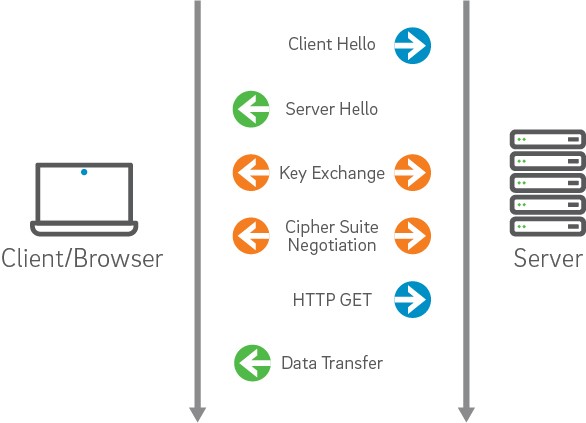
The client initiates the SSL connection by requesting a channel through the use of a ClientHello handshake message. This message contains the Cipher Suites that are configured to be supported by the client side and are available for the server to choose in creating the most secure channel configuration possible between the two machines. It also contains a random number to be used by the server in the generation of keys - this random number is a result of the configured or default RNG on a given platform.

The server side, in turn, responds with a ServerHello that includes the Cipher Suite selected by the server as the most appropriately secure suite for the channel. If a suitable cipher suite could not be selected from the list of supported suites provided by the client - the request for an SSL connection is denied by the server. It also includes a random number and the certificate that is to be used for authenticating the server to the client. This certificate must be validated by the client in order for it to be trusted as representing the identity asserted by it.


This validation is based on a number of possible factors (driven by configuration):

1.Whether it is expired
2.Whether it has been revoked
3.Whether it was issued by a trusted Certificate Authority
4.Whether the server name within the certificate matches the host name for the current connection

Where Things Can Go Wrong

There are a number of common scenarios that occur as a result of improperly configured environments, clients, servers and certificates that can be categorized into one or more of the afore mentioned categories.

The following are a few descriptions of these scenarios and what the approach to identifying the root cause might be.

Keystores and Truststores
- Categories: Configuration, Trust, Certificate Validation

The client (for mutual authentication) and server each present the other a certificate that represents the identity of the machine its running on. In order for either to present this certificate - it must be available within the appropriate Keystore.

Tip 1: Determine the default certificate for a machine as appropriate for your server and ensure that it exists within the configured Keystore and is available to the process that needs to present it to the corresponding partner process.

Tip 2: Ensure that the issuer of the presented certificate exists within the appropriate Truststore of the recipient process.

Supported Cipher Suites
- Categories: Configuration

As described earlier, the handshake involves the selection of the most secure Cipher Suite by the server from the list of supported suites presented by the client.

If there isn't a common Cipher Suite between the client and server, then there is no way for the two machines to establish a secure channel - as there is no common language that will be understood buy each party that provides the necessary protection offered by SSL.

Tip 3: Ensure that the appropriate Cipher Suites are enabled on the client and server sides in order to establish this common language for secure message exchange.

Tip 4: Utilize SSL debug information to determine which cipher suites has been selected
...


<17849795 SSL3/TLS MAC>

<17849795 received HANDSHAKE>


...


Tip 5: Utilize a tool such as SSLDump as necessary to see details of the handshake and application data message exchanges
...

11 1 0.0035 (0.0035) C>S SSLv2 compatible client hello

Version 3.1

cipher suites

TLS_RSA_WITH_RC4_128_MD5

SSL2_CK_RC4

TLS_RSA_WITH_RC4_128_SHA

TLS_DHE_DSS_WITH_RC4_128_SHA

TLS_ECDH_ECDSA_WITH_RC4_128_SHA

Unknown value 0x4e

Unknown value 0x2f

Unknown value 0x35

Unknown value 0x4b

Unknown value 0x4c

TLS_RSA_WITH_3DES_EDE_CBC_SHA

TLS_DHE_DSS_WITH_3DES_EDE_CBC_SHA

TLS_DHE_RSA_WITH_3DES_EDE_CBC_SHA

TLS_ECDH_ECDSA_WITH_3DES_EDE_CBC_SHA

Unknown value 0x50

TLS_RSA_WITH_DES_CBC_SHA

TLS_DHE_DSS_WITH_DES_CBC_SHA

TLS_DHE_RSA_WITH_DES_CBC_SHA

TLS_ECDH_ECDSA_WITH_DES_CBC_SHA

Unknown value 0x4f

TLS_RSA_EXPORT1024_WITH_RC4_56_SHA

TLS_DHE_DSS_WITH_RC2_56_CBC_SHA

TLS_RSA_EXPORT1024_WITH_DES_CBC_SHA

TLS_DHE_DSS_EXPORT1024_WITH_DES_CBC_SHA

TLS_RSA_EXPORT_WITH_RC4_40_MD5

SSL2_CK_RC4_EXPORT40

TLS_DHE_DSS_EXPORT_WITH_DES40_CBC_SHA

TLS_DHE_RSA_EXPORT_WITH_DES40_CBC_SHA

TLS_RSA_EXPORT_WITH_DES40_CBC_SHA

TLS_DH_anon_WITH_3DES_EDE_CBC_SHA

TLS_DH_anon_WITH_RC4_128_MD5

TLS_DH_anon_WITH_DES_CBC_SHA

TLS_DH_anon_EXPORT_WITH_RC4_40_MD5

TLS_DH_anon_EXPORT_WITH_DES40_CBC_SHA

TLS_DHE_DSS_EXPORT_WITH_DES40_CBC_SHA

TLS_DHE_RSA_EXPORT_WITH_DES40_CBC_SHA

TLS_RSA_EXPORT_WITH_DES40_CBC_SHA

TLS_DH_anon_EXPORT_WITH_DES40_CBC_SHA

11 2 0.0053 (0.0017) S>C Handshake

ServerHello

Version 3.1

session_id[0]=


cipherSuite TLS_DH_anon_WITH_3DES_EDE_CBC_SHA

compressionMethod NULL

11 3 0.0053 (0.0000) S>C Handshake

ServerKeyExchange

Short read: 0 bytes available (expecting 2)

11 4 0.0065 (0.0012) S>C Handshake

ServerHelloDone

11 5 0.0976 (0.0910) C>S Handshake

ClientKeyExchange

DiffieHellmanClientPublicValue[128]=

8a 23 78 02 8a a5 fc 03 f4 9b 7c 33 05 22 36 91

85 9d 17 e4 bf bf 0a 3e be 45 25 47 07 e0 9c a2

e5 d6 bf 78 95 f1 84 ca cb cc e4 3e f3 d8 d4 9a

3a 01 71 5c 29 0c 0b f9 69 8d 3e a6 f4 08 f0 36

18 fd a7 b9 3e 30 4e a4 a6 19 d9 d3 64 1c 3c 78

d3 c3 fa 83 07 58 f2 be d2 32 80 c0 32 4e 49 4c

bf 73 1a f2 d8 fd f2 16 c7 31 da 48 58 50 bb 99

3f a4 8c 31 6e 5f ed e8 0d d8 91 cf 8f eb fa d8

11 6 0.0976 (0.0000) C>S ChangeCipherSpec

11 7 0.0976 (0.0000) C>S Handshake

11 8 0.0997 (0.0021) S>C ChangeCipherSpec

11 9 0.1000 (0.0002) S>C Handshake

11 10 0.3580 (0.2580) C>S application_data

11 11 0.3580 (0.0000) C>S application_data

11 12 0.3586 (0.0005) S>C application_data

11 13 2.5039 (2.1453) C>S application_data

11 14 2.5039 (0.0000) C>S application_data

11 15 2.5053 (0.0013) S>C application_data

8 20 31.4483 (3.3621) C>S application_data

8 21 31.4483 (0.0000) C>S application_data

8 22 31.4507 (0.0024) S>C application_data

8 23 31.4508 (0.0000) S>C application_data

8 24 32.0824 (0.6316) C>S application_data

8 25 32.0824 (0.0000) C>S application_data

8 26 32.2550 (0.1726) S>C application_data

8 27 32.2550 (0.0000) S>C application_data

8 28 33.1710 (0.9159) C>S application_data

8 29 33.1710 (0.0000) C>S application_data

8 30 33.1745 (0.0035) S>C application_data

8 31 33.1754 (0.0009) C>S application_data
...

Anonymous Cipher Suite
- Categories: Configuration

The failure of a client or server to reject a certificate that is not trusted may present as potential SSL problem. Recall earlier that I describe the process of selecting the most secure Cipher Suite common between both parties.

In a scenario where one of the parties has only the anonymous Cipher Suite enabled and the other party also has it enabled - even if it is one of many - the anonymous cipher suite will be selected and the connection will not be rejected.

Tip 6: see Tip 5 above - in fact, the example ssldump output above is from troubleshooting just such a scenario

Trusted CA's

- Categories: Trust, Configuration

Unless the issuer of a certificate is found in the Truststore of a client or server involved in the establishment of an SSL connection, the certificate validation will fail.

Tip 7: Determine the Truststore/s in use and whether or not the issuer of the presented certificate exists within the configured Truststore

Tip 8: Utilize keytool in order to dump the contents of the Truststores (or keystores for the presented certificates)

Alias name: ttelesecglobalrootclass3ca
Creation date: Feb 10, 2009
Entry type: trustedCertEntry

Owner: CN=T-TeleSec GlobalRoot Class 3, OU=T-Systems Trust Center, O=T-Systems Enterprise Services GmbH, C=DE
Issuer: CN=T-TeleSec GlobalRoot Class 3, OU=T-Systems Trust Center, O=T-Systems Enterprise Services GmbH, C=DE
Serial number: 1
Valid from: Wed Oct 01 03:29:56 PDT 2008 until: Sat Oct 01 16:59:59 PDT 2033
Certificate fingerprints:
MD5: CA:FB:40:A8:4E:39:92:8A:1D:FE:8E:2F:C4:27:EA:EF
SHA1: 55:A6:72:3E:CB:F2:EC:CD:C3:23:74:70:19:9D:2A:BE:11:E3:81:D1
Signature algorithm name: SHA256withRSA
Version: 3

Extensions:

#1: ObjectId: 2.5.29.15 Criticality=true
KeyUsage [
Key_CertSign
Crl_Sign
]

#2: ObjectId: 2.5.29.19 Criticality=true
BasicConstraints:[
CA:true
PathLen:2147483647
]

#3: ObjectId: 2.5.29.14 Criticality=false
SubjectKeyIdentifier [
KeyIdentifier [
0000: B5 03 F7 76 3B 61 82 6A 12 AA 18 53 EB 03 21 94 ...v;a.j...S..!.
0010: BF FE CE CA ....
]
]


Certificate Expiration
- Categories: Certificate Validation, Configuration

Tip 9: see Tip 8 above - In the example keytool output above you can see the dates for which the particular certificate is valid.

Valid from: Wed Oct 01 03:29:56 PDT 2008 until: Sat Oct 01 16:59:59 PDT 2033

Random Number Generation (RNG) Issue
- Categories: Configuration

Performance issues may be encountered due to low or zero entropy on a server. This entropy results in longer than expected blocking in acquiring the random number seeding from /dev/random. There are a couple potential workarounds.

1.use /dev/urandom - NOTE: this may result in degenerated encryption strength and must be investigated by your system/security administrators
2.patches may be available for your particular Linux flavor or Solaris

Tip 10: Observe through SSL debug output whether or not the handshake is timing out as this is an indicator that perhaps we are blocking on the RNG

Tip 11: Ensure that all related patches have been installed on your machine.

Available Tools and Facts

Like any other specialization, troubleshooting and debugging security - and SSL in particular - presents unique challenges and to address these unique challenges we need to be prepared by having appropriate tools and facts at our disposal.

In order to be productive in this area, we need to know certain things about the environment, management consoles, etc.


Debug output
Each middleware platform provides the ability to configure the server to run with SSL debug logging turned on. This configuration enables the viewer of the logs to see pertinent information regarding the configuration and runtime behavior of the handshaking and application data message exchanges in real time.

Tip 12: Determine what the configuration mechanism is for turning on SSL debug information on your platform. On WebLogic Server the following System Properties are used to configure SSL debug information and can be used on the command line or within start up scripts:

-Dssl.debug=false -Dweblogic.StdoutDebugEnabled=true -Dweblogic.security.SSL.verbose=true

Tip 13: When you have access to starting the server with these System properties do so immediately - the information that it creates will be valuable - if not to you then to someone else that is pulled in to help debug - at which time you will be request to do so anyway and go through the whole thing again.

SSLDump

In cases where we don't have access to the server to restart with SSL debug logging or when we would like to supplement that output with additional information SSLDump is hugely valuable.

ssldump is an SSLv3/TLS network protocol analyzer. It identifies TCP connections on the chosen network interface and attempts to interpret them as SSLv3/TLS traffic. When it identifies SSLv3/TLS traffic, it decodes the records and displays them in a textual form to stdout. If provided with the appropriate keying material, it will also decrypt the connections and display the application data traffic.

Tip 14: Download a copy of ssldump from http://www.rtfm.com/ssldump/. You will need to build it on your platform and you may actually need to resolve a couple compilation errors - but it is well worth it.

Examples:

To listen to traffic on port 443:
ssldump -i eth0 port 443

To listen to traffic to the server target on port 443:
ssldump -i eth0 port 443 and host target

To decrypt traffic to the host target server.pem and the password foobar:
ssldump -i eth0 -Ad -k ~/server.pem -p foobar host target

Generic SSL Client

Once you have ssldump built and running on your machine, you can use any SSL client to target the server that you are trying to troubleshoot. Often a browser will suffice - however you may need to build a client more appropriate for your usecase.

Tip 15: Utilize ssldump, SSL debug logging and your SSL client to observe the messages exchanged and the runtime behavior that manifests as a result of your current configuration.

Platform Specific Knowledge

Become intimately familiar with where the appropriate keystores, truststores, configuration files and management consoles are located.

Tip 16: Maintain a checklist of this information and keep it handy so that you don't have to rediscover it every time you encounter SSL issues.

Books

SSL and TLS: Designing and Building Secure Systems, Addison-Wesley, 2001 ISBN 0-201-61598-3

http://www.rtfm.com/sslbook/

PEER 1 Network Enterprises, Inc today announced a collaboration with InMon to provide precise bandwidth measurement and analysis capability.

PEER 1 will deploy the industry standard sFlow® network monitoring technology and InMon’s Traffic Sentinel, in all of its data centers to provide an industry leading bandwidth billing solution for its Managed Hosting customers.

Bandwidth usage is measured on a per-IP address basis, so PEER 1 is able to ignore traffic occurring inside the data center, and provide precise traffic charges to its customers in a way that is not possible through per-port or physical-layer network traffic monitoring.

For PEER 1 customers, the InMon-powered network traffic monitoring and analysis is accessible in real time through the online customer portal with customizable graphs and downloadable data.

Ted Smith, SVP of Operations at PEER 1 said: “We believe our customers should only pay for the services they use and our collaboration with InMon maximizes our network analysis and measurement capability allowing us to accurately pass on lowest cost bandwidth charges to customers. Our IP-based or layer three approach not only increases transparency and billing accuracy, it also enables our customers to accurately re-charge bandwidth usage to their own customers.”

”The unique scalability of InMon’s sFlow solution makes it the ideal choice for monitoring the fastest of data center networks,” said Peter Phaal, president of InMon Corp. “In the expert hands of the PEER 1 engineers, the detailed traffic database in the Sentinel product can be applied to a wide range of applications, from accounting and capacity planning to troubleshooting and security.”

PEER 1 Network Enterprises, Inc today announced a collaboration with InMon to provide precise bandwidth measurement and analysis capability.

PEER 1 will deploy the industry standard sFlow® network monitoring technology and InMon’s Traffic Sentinel, in all of its data centers to provide an industry leading bandwidth billing solution for its Managed Hosting customers.

Bandwidth usage is measured on a per-IP address basis, so PEER 1 is able to ignore traffic occurring inside the data center, and provide precise traffic charges to its customers in a way that is not possible through per-port or physical-layer network traffic monitoring.

For PEER 1 customers, the InMon-powered network traffic monitoring and analysis is accessible in real time through the online customer portal with customizable graphs and downloadable data.

Ted Smith, SVP of Operations at PEER 1 said: “We believe our customers should only pay for the services they use and our collaboration with InMon maximizes our network analysis and measurement capability allowing us to accurately pass on lowest cost bandwidth charges to customers. Our IP-based or layer three approach not only increases transparency and billing accuracy, it also enables our customers to accurately re-charge bandwidth usage to their own customers.”

”The unique scalability of InMon’s sFlow solution makes it the ideal choice for monitoring the fastest of data center networks,” said Peter Phaal, president of InMon Corp. “In the expert hands of the PEER 1 engineers, the detailed traffic database in the Sentinel product can be applied to a wide range of applications, from accounting and capacity planning to troubleshooting and security.”